
Learning Outcomes
After successfully completing a 5 day Siemens PLC course the participant should be able to:
- Design and Write PLC programs and understand their structures.
- Troubleshoot / Fault find PLC hardware and software issues around Plant machinery using laptops with specific software to integrate these complex systems.
- Involve participants in workshops designed to develop their own applications and advances their existing programming skills and fault-finding skills.
- Increased Level of understanding as to how Automation
- Systems in general work.
Who Is This Course For
-
The "Hands On Workshop" is designed for Engineers, Technicians, Electricians, Maintenance Personnel and those who have some knowledge of PLC's and want to gain a better understanding and a good practical knowledge of Siemens PLC's
Course Content
- Chapter 1: Introductions
- Chapter 2: Siemens S7 PLC Hardware
- Description of Simatic S7 Range of PLCs.
- Central Processing Units.
- Digital Input / Output Modules
- Analogue Input / Output Modules
- Power Supplies
- Absolute / Symbolic Addressing
- Chapter 3: Siemens S7 PLC Hardware
- Communications Processors (CP)
- RS340, 341, etc
- Profibus Modules
- Remote I/O ET200M, ET200S
- ASi Modules
- Ethernet Modules
- GSD Files
- Hardware Updates
- Exercises
- Chapter 4: Creating and Handling Projects.
- Project Settings, PLC, Block, Symbol, Documentation, Option, Eprom, STL. Batch No
- Transfer, Compare, Delete & Copy Blocks to & from the PLC / PC
- Edit “Load” Settings
- Exercises
- Edit “Save” Settings
- Edit “Save As” Settings
- Edit “Archive” Settings
- Edit “Dearchive” Settings
- Chapter 5: Siemens S7 PLC Hardware
- S7 Functionality Online / Offline. What is the difference.
- Program Structure Calls
- Storing Programs on EPROM /RAM / MEDIA Cards
- Options using PG Interface using CP5511, ISO TCP/IP WIRELESS, PPI, MPI/DP
- Chapter 6: Fundamentals of PLC Software
- Methods of Representation i.e. Ladder Logic, Statement List and FBD
- Overview of OBs, FBs FCs, SFBs, SFC’s, DBs and SDB’s
- Fundamental Ladder Logic Instruction Set “AND” & “OR” etc
- Contacts Normally “OPEN” & “CLOSED”
- Exercises
- Chapter 7: Binary & Logic Operations
- Create a user program in LAD, STL & FBD for “AND” Logic Function, “OR” Logic Function
- Exercises
- Chapter 7: Binary & Logic Operations Cont
- “AND” Before “OR”
- “OR” Before “AND”
- Motor Start/Stop Circuit
- “OPEN” & “CLOSED”
- Online status, using LAD, FBD, STL
- Introduction to Statement List. Explain the rules used
- Exercises
- Chapter 8: RS Flip Flops / Comparators
- RS Flip Flops
- SR Flip Flops
- Explain the difference between RS/SR
- Comparators
- BCD
- Chapter 9: Timers
- Pulse Timers
- Extended Pulse Timers
- On Delay Timers
- Explain the Timing diagrams. Always causes confusion.
- Exercises
- Chapter 9: Timers Cont
- Stored On Delay Timers
- Off Delay Timers
- Exercises
- Chapter 10: Counters
- Count Up Counter
- Count Down Counters
- Exercises
- Chapter 11: Numbering Systems
- Representation
- What are “BITS” “BYTES” “WORD” and “REAL VALUES”
- Binary, Hexidecimal, Decimal ASCII and BCD
- Edit the Force Variable
- Processing and Storing numbers in the PLC
- Load and Transfer Functions
- The PLC Accumulators
- Exercise
- Chapter 12: Monitor & Force Variables
- Create VAT Tables
- Save VAT Tables
- Modify / Monitor Variables
- Chapter 12: Monitor & Force Variables Cont
- Force Outputs
- Force Inputs, Explain the consequences. Demonstrate the LED Force
- Exercises
- Chapter 13 Restart & Performance Characteristics
- Stop Mode
- Run Mode
- Cold Restart
- Warm Restart
- Chapter 14 Introduction to Trouble Shooting
- Types of Faults
- Error Indicators on the CPU
- PLC Info “ISTACK” & “BSTACK”
- Exercises
- Chapter 15: Program Structure of An Existing PLC System
- General Layout of Software
- Organisation Blocks
- Function Blocks Used
- Function Calls Used
- Data Blocks Used
- Instance Data Blocks
- Exercises
- Chapter 15: Program Structure of Existing PLC System Cont,
- Function Blocks Used
- Data Blocks Used
- Exercises
- Take the Class outside to a PLC System
- Copy PLC Program to Harddisk
- Compare PLC Software with copied version
- Status of program Online / Offline
- Startup of PLC Questions
Check out our training facilities here
Trainer Profile
Desmond Foley is the founder and MD of Focus Engineering. Des has worked in many industries including Pharmaceutical, Power Generation, Oil and Gas, Food and Beverage and Medical Supplies. He has worked in the Automation Industry for more than 30 years.
He has been responsible for activities ranging from design, program development, testing and commissioning of PLC control systems, to the management of automation projects as a Senior Projects/Automation Engineer. Des has a BSc in Engineering, Dip in EE and Dip in HR.
Assessment & Accreditation
This programme is a QQI component (minor) award, certified at Level 6 on the national framework of qualifications – see www.nfq.ie and is an elective component of major awards.
The date of the examination is given to each participant during the course, with full guidance and support given by the Trainer.
Continued Learning Opportunities With Other Relevant Courses
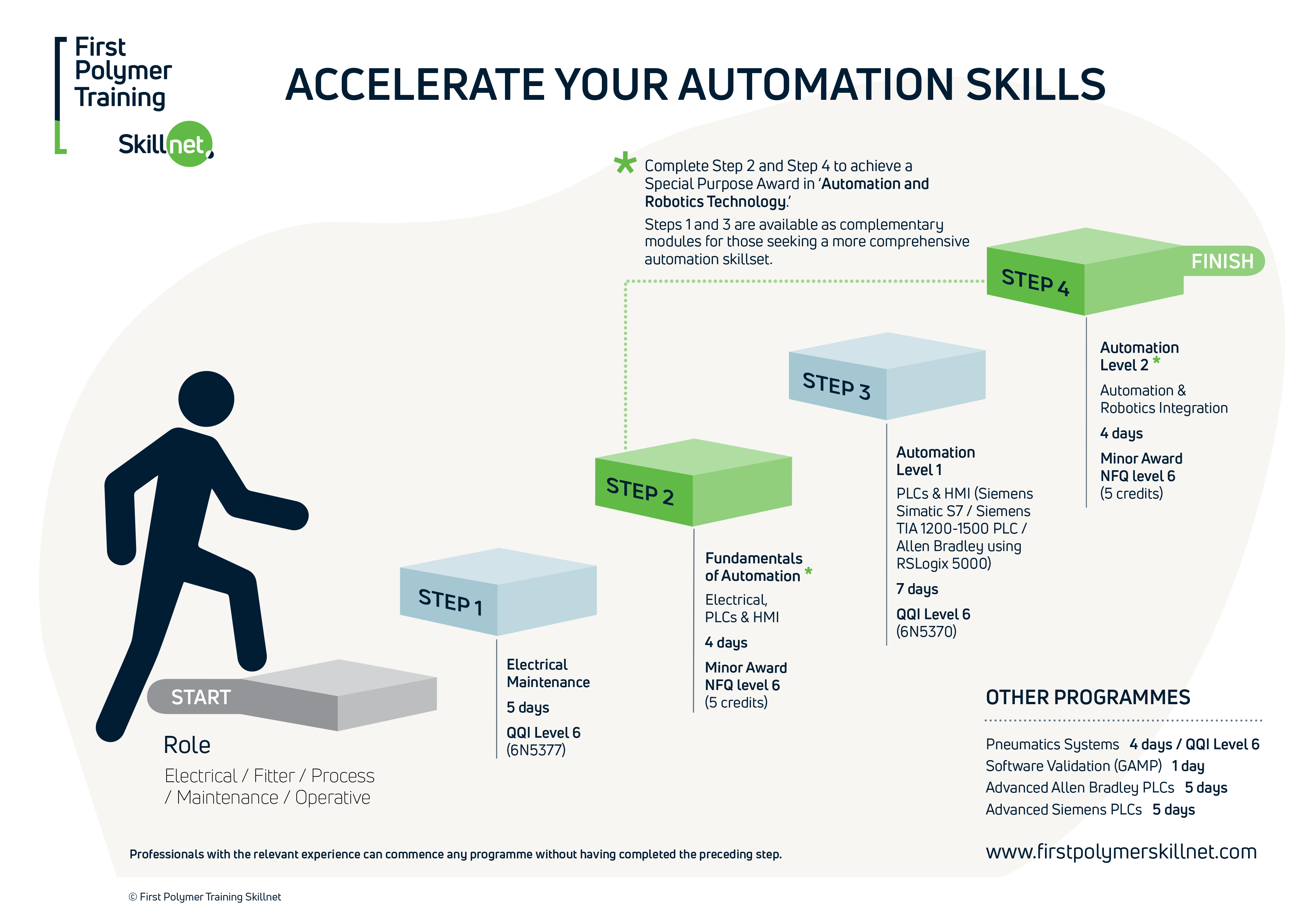
First Polymer Training Skillnet’s programmes are designed to offer continued skills development and career enhancement opportunities. See our progression charts for Automation and Injection Moulding.
- Introduction to Automation: PLCs and Scada HMIs
- Siemens Simatic S7
- Siemens TIA 1200-1500 PLCs
- Allen Bradley using RSLogix 5000
- Major Award in Injection Moulding (Level 5)
- Degree in Polymer Processing (Level 6 / 7 / 8)